This has been brought to my attention today. I see this as a huge win for Ubuntu, since, let's face it, Broadcom devices are a large part of the WiFi device ecosystem. I'm happy to see Broadcom finally publishing some of their source code, and through this helping out Linux users of all distributions get better working WiFi. I see this as a win for Ubuntu in general because it will always make me happier to see people having fewer issues with wireless devices. This also translates to less wheel-spinning with broken drivers we could not possibly fix (since they are closed source), towards more productive work on other aspects of Ubuntu... or just a better chance of fixing driver issues :)
Of course, this is a work in progress and not all Broadcom devices are currently supported by this driver, but I believe that in due time, Broadcom could become one of the golden examples we can give to hardware manufacturers on how to provide the best kind of support they can to the Linux community.
Read more about this on Slashdot, OSNews, or read the annoucement on the Linux Wireless mailing list.
Thanks Broadcom!
Friday, 10 September 2010

Wednesday, 25 August 2010
Ubuntu Global Jam in Montreal: help testing and fixing bugs in Maverick
We're doing it again!
Here in Montreal we're just about ready to start jamming this weekend. Rooms have been confirmed, and we already have a fair amount of interest from what I can see in the LoCo directory event listing! We're also happy to have been sharing ideas and plans with txwikinger who's been organizing the Global Jam event in the Waterloo/Kitchener area in Ontario.
Do you want to help make Ubuntu better?
Do you look forward to meeting some of the people who do testing, triaging and bug fixing on Ubuntu in Montreal, and maybe ask them to look at your own little pet-peeve bugs?
Then come join us at the SupInfo Montréal offices this Saturday, starting from 9am! All you need to bring is a computer and willingness to participate. :)
If you choose to pass by, please let us know by registering for the event on the LoCo Directory... just so we know roughly how many people to expect.
You can get all of the information about our event on the QuebecTeam wiki: QuebecTeam/GlobalJam.
As a side note, we should have a local archive mirror, and copies of maverick and lucid ISO images. I've spent the past weeks preparing it on a portable USB hard drive, after getting some help in starting from Dustin Kirkland. Thanks Dustin!
Here in Montreal we're just about ready to start jamming this weekend. Rooms have been confirmed, and we already have a fair amount of interest from what I can see in the LoCo directory event listing! We're also happy to have been sharing ideas and plans with txwikinger who's been organizing the Global Jam event in the Waterloo/Kitchener area in Ontario.
Do you want to help make Ubuntu better?
Do you look forward to meeting some of the people who do testing, triaging and bug fixing on Ubuntu in Montreal, and maybe ask them to look at your own little pet-peeve bugs?
Then come join us at the SupInfo Montréal offices this Saturday, starting from 9am! All you need to bring is a computer and willingness to participate. :)
| SupInfo Montréal | |
| 752 Rue Sherbrooke Ouest | |
| Montreal | |
| Canada | |
| http://www.supinfo.com/en/News0eaaf665-d9bf-4563-befb-ac97f8b035c2.aspx |
If you choose to pass by, please let us know by registering for the event on the LoCo Directory... just so we know roughly how many people to expect.
You can get all of the information about our event on the QuebecTeam wiki: QuebecTeam/GlobalJam.
As a side note, we should have a local archive mirror, and copies of maverick and lucid ISO images. I've spent the past weeks preparing it on a portable USB hard drive, after getting some help in starting from Dustin Kirkland. Thanks Dustin!
Monday, 28 June 2010
Wubi: installing Ubuntu inside Windows
Do you know about Wubi?
Wubi is a very nice tool if you want to try out Ubuntu for the first time. It allows you to install Ubuntu alongside Windows, without re-partitioning your hard-drive. All this from the CD-ROM if you load it in computer while Windows is running, or downloadable as a standalone app.
The Ubuntu QA team is always looking for help to test installing Ubuntu using Wubi. It's both a great way to try Ubuntu if you really still need to run Windows on your computer and want to help out with testing Ubuntu, or as any kind of first jump into testing and QA. Testing efforts are being tracked on the Ubuntu ISO Tracker. If you want to help, please read the documentation first.
So if you chose to download Wubi's standalone application, double-click on its icon, or load in the Ubuntu CD-ROM you may have just burned (or received from shipit or your LoCo team).
If you're using a CD-ROM, Wubi should start automatically (or in Windows 7, you should see an autorun dialog).


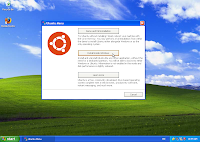 The install application gives you three choices. The first one being to reboot your system and use the CD-ROM directly to demo and install Ubuntu, the third sends you to the Ubuntu website.
For the purpose of this post I will instead walk you through option 2, which is to install Ubuntu alongside Windows, from within Windows.
 You will then be presented with all the questions that make sure the installer knows everything it needs to know about the installation of Ubuntu you want to do. Choose your username, password, and where you want to install Ubuntu (which Windows harddrive, C:, D:, or whatever), what language you want to see Ubuntu in, etc.
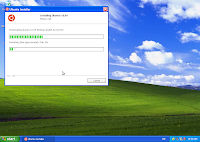 If you're using the standalone Wubi app, you will need to wait a bit while the Ubuntu CD ISO image is being downloaded. The image is necessary, as the standalone app does not contain the required packages for the install.
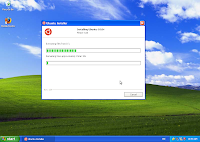 Wubi will then proceed to the next part of the installation, which is to copy everything it needs to your hard drive in a ubuntu folder on the hard drive you selected in the preceeding screen.
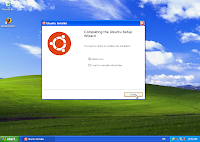 Once the first part of the installation is over, select what you want to do... my preference is to reboot right away and carry on with the rest of the installation procedure.
 Once your computer has booted, you will be presented with a menu. That menu will time out and default to Windows after a few seconds. Choose Ubuntu to continue with the installation.
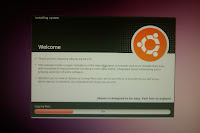 You are now booting into the real thing: at this point you are in Ubuntu, but the installation isn't quite done yet, so grab a (quick) coffee while the last tidbits get copied and configured.
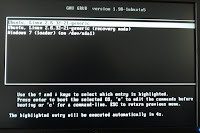 At the end of the second part of the installation, your computer will reboot again, present you again with the first menu where you will want to choose Ubuntu, and show an additional menu where you can choose to start Ubuntu in recovery mode, should you need to fix a broken installation. From there, you can also go back to Windows.
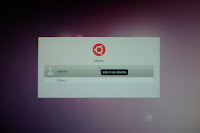 Voilà, the installation is done. At this point, all that is left to do is click on your username in the lis and enter the password you chose back in Windows during the first phase of the installation to get to the Ubuntu desktop.
Wubi is a very nice tool if you want to try out Ubuntu for the first time. It allows you to install Ubuntu alongside Windows, without re-partitioning your hard-drive. All this from the CD-ROM if you load it in computer while Windows is running, or downloadable as a standalone app.
The Ubuntu QA team is always looking for help to test installing Ubuntu using Wubi. It's both a great way to try Ubuntu if you really still need to run Windows on your computer and want to help out with testing Ubuntu, or as any kind of first jump into testing and QA. Testing efforts are being tracked on the Ubuntu ISO Tracker. If you want to help, please read the documentation first.
So if you chose to download Wubi's standalone application, double-click on its icon, or load in the Ubuntu CD-ROM you may have just burned (or received from shipit or your LoCo team).
If you're using a CD-ROM, Wubi should start automatically (or in Windows 7, you should see an autorun dialog).


 The install application gives you three choices. The first one being to reboot your system and use the CD-ROM directly to demo and install Ubuntu, the third sends you to the Ubuntu website.
For the purpose of this post I will instead walk you through option 2, which is to install Ubuntu alongside Windows, from within Windows.
 You will then be presented with all the questions that make sure the installer knows everything it needs to know about the installation of Ubuntu you want to do. Choose your username, password, and where you want to install Ubuntu (which Windows harddrive, C:, D:, or whatever), what language you want to see Ubuntu in, etc.
 If you're using the standalone Wubi app, you will need to wait a bit while the Ubuntu CD ISO image is being downloaded. The image is necessary, as the standalone app does not contain the required packages for the install.
 Wubi will then proceed to the next part of the installation, which is to copy everything it needs to your hard drive in a ubuntu folder on the hard drive you selected in the preceeding screen.
 Once the first part of the installation is over, select what you want to do... my preference is to reboot right away and carry on with the rest of the installation procedure.
 Once your computer has booted, you will be presented with a menu. That menu will time out and default to Windows after a few seconds. Choose Ubuntu to continue with the installation.
 You are now booting into the real thing: at this point you are in Ubuntu, but the installation isn't quite done yet, so grab a (quick) coffee while the last tidbits get copied and configured.
 At the end of the second part of the installation, your computer will reboot again, present you again with the first menu where you will want to choose Ubuntu, and show an additional menu where you can choose to start Ubuntu in recovery mode, should you need to fix a broken installation. From there, you can also go back to Windows.
 Voilà, the installation is done. At this point, all that is left to do is click on your username in the lis and enter the password you chose back in Windows during the first phase of the installation to get to the Ubuntu desktop.
Tuesday, 15 June 2010
HP Mini netbooks mic/headphones adapter
Engineers at HP have been having these wonderful ideas in hope of saving space (I guess). On some of their netbooks, in particular the Mini 1000, there is only one 3.5mm port to be used for both the microphone and headphones.
I needed to tests this system in order to confirm the status of bug #532958. If you're like me and didn't get an adapter with the system, here is how you can make one.
Requirements:

Process:
Note the type of cable I'm using: it is somewhat important. You could of course use any type of cable with at least 3 wires, but you would then have to find a 4-channel 3.5mm plug, which is a little less easy to find. This cable already has it, so just remove the RCA plugs, and skin these ends to reveal the signal wire and ground.
You'll want to then attach the wires to the 3.5mm jacks as shown in the pictures below.

Result:
If the jacks aren't properly grounded or the RCA cable you have used uses a different pinout, you will get no sound, or mono sound, or just very low volume. If so, detach everything and start over, maybe using different color mixes.
 Once done correctly, you will retain stereo sound for the headphones, and will be able to use an external microphone, though the internal mic is disabled when this adapter is connected and the setting in Sound Input is at "Microphone". To use the internal microphone instead, you would want to use "Line Input"... but then you probably don't need this adapter and would be better off using standard headphones.
Note: after more research, I found out that an iPhone headset might be the easiest way to go. I however do not own an iPhone, and only found out after finishing up the adapter.
I needed to tests this system in order to confirm the status of bug #532958. If you're like me and didn't get an adapter with the system, here is how you can make one.
Requirements:

- 1 cable: 3 RCA plugs to one 4-channel 3.5mm plug - costs about 2$ to 10$
- 2 1/8 (3.5mm) female jack, of the type you prefer (I used chassis) - cost less than a dollar each
Process:
Note the type of cable I'm using: it is somewhat important. You could of course use any type of cable with at least 3 wires, but you would then have to find a 4-channel 3.5mm plug, which is a little less easy to find. This cable already has it, so just remove the RCA plugs, and skin these ends to reveal the signal wire and ground.
You'll want to then attach the wires to the 3.5mm jacks as shown in the pictures below.

- Headphone end: use the yellow and red RCA wires. Attach the colored wires to the ring and tip (the name for the metal tabs that carry actual signal when everything is connected, at the bottom of the jack), then attach both ground wires to the ground tab (the tab sticking out to the side).
- Microphone end: use the white RCA wire, attach to either the ring or tip, then ground it.
Result:
If the jacks aren't properly grounded or the RCA cable you have used uses a different pinout, you will get no sound, or mono sound, or just very low volume. If so, detach everything and start over, maybe using different color mixes.
 Once done correctly, you will retain stereo sound for the headphones, and will be able to use an external microphone, though the internal mic is disabled when this adapter is connected and the setting in Sound Input is at "Microphone". To use the internal microphone instead, you would want to use "Line Input"... but then you probably don't need this adapter and would be better off using standard headphones.
Note: after more research, I found out that an iPhone headset might be the easiest way to go. I however do not own an iPhone, and only found out after finishing up the adapter.
Tuesday, 18 May 2010
If you're filing bugs: please don't be selfish!
<rant>
If you're filing bugs, I understand that you feel strongly about the issues you're seeing, and that you feel like your problem is important and deserves immediate attention. I also want "my" bugs to be dealt with as soon as possible, and as a Ubuntu contributor I also want *your* bugs to be fixed in a timely manner. However, you usually should not just add information to an existing bug because the symptoms are vaguely similar.
My point is, if you're seeing that something is wrong with your hardware (because this type of issue is quite frequent with hardware-related bugs), please don't hesitate to open a new bug. Developers will often be quite pleased that you did, and will be happy to mark something as a duplicate of another bug for you. Other bug reporters will also be happier, because it allows their own, often unrelated issue to be dealt with rapidly. Your own bug will also likely be fixed earlier, since developers need to sift through less information related to a specific issue: they then need to decide whether a specific attachment or comment is relevant in far fewer cases.
It just helps making the experience more enjoyable to everyone.
Also, if you're suggesting in a bug report against a specific package to use another package, you're not being helpful. Sure, you help the reporter by fixing their immediate problem, but you're not helping the underlying issues being resolved. What we want is to have all projects improve and squash their bugs, which cannot be done if you, say, suggest using Wicd in a bug against NetworkManager for a broken wifi driver.
I like both of these projects, I want both to succeed equally, which means that bugs need to be reported and respected so that we can fix the issues that arise and deliver a better user experience to everyone; while allowing all projects to grow and improve. This is what suggesting that project X is a failure (that's usually not the words used, but you get the idea), and that project Y is better (because it doesn't have that specific issue), will never achieve.
It all boils down to being nice to others. Nice to other bug reporters, because everyone has the same chance of getting their bugs fixed, and nice to other projects because they all get their share of bugs and success stories.
</rant>
If you're filing bugs, I understand that you feel strongly about the issues you're seeing, and that you feel like your problem is important and deserves immediate attention. I also want "my" bugs to be dealt with as soon as possible, and as a Ubuntu contributor I also want *your* bugs to be fixed in a timely manner. However, you usually should not just add information to an existing bug because the symptoms are vaguely similar.
My point is, if you're seeing that something is wrong with your hardware (because this type of issue is quite frequent with hardware-related bugs), please don't hesitate to open a new bug. Developers will often be quite pleased that you did, and will be happy to mark something as a duplicate of another bug for you. Other bug reporters will also be happier, because it allows their own, often unrelated issue to be dealt with rapidly. Your own bug will also likely be fixed earlier, since developers need to sift through less information related to a specific issue: they then need to decide whether a specific attachment or comment is relevant in far fewer cases.
It just helps making the experience more enjoyable to everyone.
Also, if you're suggesting in a bug report against a specific package to use another package, you're not being helpful. Sure, you help the reporter by fixing their immediate problem, but you're not helping the underlying issues being resolved. What we want is to have all projects improve and squash their bugs, which cannot be done if you, say, suggest using Wicd in a bug against NetworkManager for a broken wifi driver.
I like both of these projects, I want both to succeed equally, which means that bugs need to be reported and respected so that we can fix the issues that arise and deliver a better user experience to everyone; while allowing all projects to grow and improve. This is what suggesting that project X is a failure (that's usually not the words used, but you get the idea), and that project Y is better (because it doesn't have that specific issue), will never achieve.
It all boils down to being nice to others. Nice to other bug reporters, because everyone has the same chance of getting their bugs fixed, and nice to other projects because they all get their share of bugs and success stories.
</rant>
Tuesday, 27 April 2010
You're invited: Montreal Lucid Lynx release party!
The Ubuntu-Quebec team is having a party here in Montreal (and in other cities too!!!) once more, this time to celebrate the release of Lucid Lynx. This will once again be held at the Bar Le Saint-Sulpice:
Bar Le Saint-Sulpice
1680, Saint-Denis,
Montréal, Québec,
H2X3K6,
514 844-9458
Everyone's invited to join us there this Thursday, April 29th.
Lots of people have already either RSVP'd using the wonderful LoCo Directory event pages, and many others have confirmed their presence already...
There's going to be a couple of other parties going on this time in the province: another one in Montreal on May 20th, Dummondville and Quebec city on the 5th and 6th of May; if you want to know more, don't hesitate to visit our wiki page for the Lucid release parties organized by Ubuntu-Quebec: https://wiki.ubuntu.com/QuebecTeam/LucidParty
Join us and have a chance to meet other Ubuntu enthusiasts like you :)
Bar Le Saint-Sulpice
1680, Saint-Denis,
Montréal, Québec,
H2X3K6,
514 844-9458
Everyone's invited to join us there this Thursday, April 29th.
Lots of people have already either RSVP'd using the wonderful LoCo Directory event pages, and many others have confirmed their presence already...
There's going to be a couple of other parties going on this time in the province: another one in Montreal on May 20th, Dummondville and Quebec city on the 5th and 6th of May; if you want to know more, don't hesitate to visit our wiki page for the Lucid release parties organized by Ubuntu-Quebec: https://wiki.ubuntu.com/QuebecTeam/LucidParty
Join us and have a chance to meet other Ubuntu enthusiasts like you :)
Wednesday, 7 April 2010
In retrospect: the good and the bad about the Global Jam event in Montreal
Well, it's better late than never. The bad is obviously how it has taken me more than a week to get to writing this blog post about how well our Global Jam event went :)
Seriously though, I did notice there were slightly fewer people this time around, but this can be inputed to a number of variables, so I really have no reason to complain, we had a great time, found a great number of bugs that were reported (and/or triaged), and it's essentially a clear success. Thanks to all those who participated in making this a great event.
If you want to look at the pictures for our event, you can see them here. There was also a live video made by r2mxr, but I can't find the link to it anymore... I promise I will update about it soon.
Thanks to Fabian Rodriguez and David Bensimon who joined in and helped out a lot in finding bugs, testing, reproducing, and confirming bugs.
Thanks to Philippe Gauthier who did a terrific job at a number of things, including setting, at least in my eyes, the record for the quickest testing process ever. Wine with a Windows app, as well as other Linux applications installed in record time :)
Obviously, thanks to the presenters for a great time: Ronan Jouchet, Michael Faille, Jeff Fortin... You did great, and I learned a lot. I'm sure a lot of others did as well.
Thanks to the SUPInfo students for visiting, you boosted our numbers and gave us a new and different outlook on various issues, which was a clear benefit.
Thanks to ETS, and in particular to Oleg Litvinsky for doing an awesome job at the logistics. I've never seen a room get set up so fast, I felt useless :)
Finally, thanks to those who came in to join us to see presentations or help out with bugs, it was great to see you all and meet new people, or others who we discuss with on the mailing list but rarely have a chance to talk to, face-to-face.
Seriously though, I did notice there were slightly fewer people this time around, but this can be inputed to a number of variables, so I really have no reason to complain, we had a great time, found a great number of bugs that were reported (and/or triaged), and it's essentially a clear success. Thanks to all those who participated in making this a great event.
If you want to look at the pictures for our event, you can see them here. There was also a live video made by r2mxr, but I can't find the link to it anymore... I promise I will update about it soon.
Thanks to Fabian Rodriguez and David Bensimon who joined in and helped out a lot in finding bugs, testing, reproducing, and confirming bugs.
Thanks to Philippe Gauthier who did a terrific job at a number of things, including setting, at least in my eyes, the record for the quickest testing process ever. Wine with a Windows app, as well as other Linux applications installed in record time :)
Obviously, thanks to the presenters for a great time: Ronan Jouchet, Michael Faille, Jeff Fortin... You did great, and I learned a lot. I'm sure a lot of others did as well.
Thanks to the SUPInfo students for visiting, you boosted our numbers and gave us a new and different outlook on various issues, which was a clear benefit.
Thanks to ETS, and in particular to Oleg Litvinsky for doing an awesome job at the logistics. I've never seen a room get set up so fast, I felt useless :)
Finally, thanks to those who came in to join us to see presentations or help out with bugs, it was great to see you all and meet new people, or others who we discuss with on the mailing list but rarely have a chance to talk to, face-to-face.
Subscribe to:
Posts (Atom)