Hi!
The Ubuntu Developer Membership Board is in need of new blood.
Of the seven members of the board, five (5) will be expiring on March 9th. Members of the Developer Membership Board are elected by all Ubuntu Developers for a term of 2 years, meeting in #ubuntu-meeting about once a fortnight. Candidates should be Ubuntu developers themselves, and should be well qualified to evaluate prospective Ubuntu developers.
The DMB is responsible for reviewing developer applicants and decides when to entrust them with developer privileges or to grant them Ubuntu membership status.
Providing at least six valid nominations are received, the new members will be chosen using Condorcet voting. Members of the ubuntu-dev team in Launchpad will be eligible to vote, and will receive voting ballots by email (to their email address recorded in Launchpad). A Call for Nominations has already been sent by email to the ubuntu-devel-announce mailing list (but another call for nominations should follow soon): https://lists.ubuntu.com/archives/ubuntu-devel-announce/2016-February/001167.html.
Applications should be sent as GPG-signed emails to developer-membership-board at lists.ubuntu.com (which is a private mailing list accessible only by DMB members).
Of course, if you're nominating a developer other than yourself, please make sure to ask who you're about to nominate beforehand, to make sure they're okay with it.
Showing posts with label community. Show all posts
Showing posts with label community. Show all posts
Monday, 29 February 2016

Friday, 15 January 2016
In full tinfoil hat mode: Using GPG with smartcards
Breaking OPSEC for a bit to write a how-to on using GPG keys with smartcards...
I've thought about experimenting with smartcards for a while. Turns out that my Thinkpad has a built-in smartcard reader, but most of my other systems don't. Also, I'd like to use a smartcard to protect my SSH keys, some of which I may use on systems that I do not fully control (ie. at the university to push code to Github or Bitbucket), or to get to my server. Smartcard readers are great, but they're not much fun to add to a list of stuff to carry everywhere.
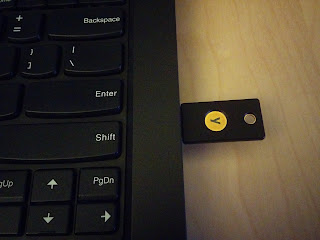
There's an alternate option: the Yubikey. Yubico appears to have made a version 4 of the Yubikey which has CCID (smartcard magic), U2F (2-factor for GitHub and Google, on Chrome), and their usual OTP token, all on the same tiny USB key. What's more, it is documented as supporting 4096 bit RSA keys, and includes some ECC support (more on this later).
 Setting up GPG keys for use with smartcards is simple. One has the choice of either creating your own keys locally, and moving them on the smartcard, or generating them on the smartcard right away. In other to have a backup of my full key available in a secure location, I've opted to generate the keys off of the card, and transferring them.
For this, you will need one (or two) Yubikey 4 (or Yubikey 4 Nano, or if you don't mind being limited to 2048 bit keys, the Yubikey NEO, which can also do NFC), some backup media of your choice, and apparently, at least the following packages:
You should do all of this on a trusted system, not connected to any network.
First, setup gnupg2 to a reasonable level of security. Edit ~/.gnupg/gpg.conf to pick the options you want, I've based my config on Jeffrey Clement's blog entry on the subject:
The downside to all of this is that you'll need to use gpg2 in all cases rather than gpg; which is still the default on Ubuntu and Debian. gpg2 so far seems to work just fine for ever use I've had (including debsign, after setting DEBSIGN_PROGRAM=gpg2 in ~/.devscripts).
You can now generate your master key:
Then edit the key to add new UIDs (identities) and subkeys, which will each have their own different capabilities:
Add the subkeys. You should have one of encryption, one for signing, and one for authentication. Works out pretty well, since there are three slots, one for each of these capabilities, on the Yubikey.
If you also want your master key on a smartcard, you'll probably need a second Yubikey (that's why I wrote two earlier), which would only get used to sign other people's keys, extend expiration dates, generate new subkeys, etc. That one should be left in a very secure location.
This is a great point to backup all the keys you've just created:
Next step is to configure the smartcard/Yubikey to add your name, a URL for the public key, set the PINs, etc. Use the following command for this:
Finally, go back to editing your GPG key:
From this point you can use toggle to select each subkey (using key #), move them to the smartcard (keytocard), and deselect them (key #). To move the master key to the card, "toggle" out of toggle mode then back in, then immediately run 'keytocard'. GPG will ask if you're certain. There is no way to get a key back out of the card, if you want a local copy, you needed to make a backup first.
Now's probably a great time to copy your key to a keyserver, so that people may eventually start to use it to send you encrypted mail, etc.
After transferring the keys, you may want to make a "second backup", which would only contain the "clues" for GPG to know on which smartcard to find the private part of your keys. This will be useful if you need to use the keys on another system.
Another option is to use the public portion of your key (saved somewhere, like on a keyserver), then have gpg2 discover that it's on a smartcard using:
Unfortunately, it appears to only manage to pick up either only the master key, or only the subkeys, if you use separate smartcards. This may be a blessing in disguise, in that you'd still only use the master key on an offline, very secure system, and only the subkeys in your typical daily use scenario.
Don't forget to generate a revocation certificate. This is essential if you ever lose your key, if it's compromised, or you're ever in a situation where you want to let the world know quickly not to use your key anymore:
Finally, more on backing up the GPG keys. It could be argued that keeping your master key on a smartcard might be a bad idea. After all, if the smartcard is lost, while it would be difficult to get the key out of the smartcard, you would probably want to treat it as compromised and get the key revoked. The same applies to keys kept on USB drives or on CD. A strong passphrase will help, but you still lost control of your key and at that point, no longer know whether it is still safe.
What's more, USB drives and CDs tend to eventually fail. CDs rot after a number of years, and USB drives just seem to not want to work correctly when you really need them. Paper is another option for backing up your keys, since there are ways (paperkey, for instance) to represent the data in a way that it could either be retyped or scanned back into digital data to be retrieved. Further securing a backup key could involve using gfshare to split it into multiple bits, in the hope that while one of its locations could be compromised (lost), you'll still have some of the others sufficient to reconstruct the key.
With the subkeys on the Yubikey, and provided gpg2 --card-status reports your card as detected, if you have the gpg-agent running with SSH support enabled you should be able to just run:
And have it list your card serial number. You can then use ssh-add -L to get the public key to use to add to authorized_keys files to use your authentication GPG subkey as a SSH key. If it doesn't work, make sure the gpg-agent is running and that ssh-add uses the right socket, and make sure pcscd isn't interfering (it seemed to get stuck in a weird state, and not shutting down automatically as it should after dealing with a request).
Whenever you try to use one of the subkeys (or the master key), rather than being asked for the passphrase for the key (which you should have set as a very difficult, absolutely unguessable string that you and only you could remember and think of), you will be asked to enter the User PIN set for the smartcard.
You've achieved proper two-factor authentication.
Note of ECC on the Yubikey: according to the marketing documentation, the Yubikey knows about ECC p256 and ECC p384. Unfortunately, it looks like safecurves.cr.yp.to considers these unsafe, since they do not meet all the SafeCurves requirements. I'm not especially versed in cryptography, but this means I'll read up more on the subject, and stay away from the ECC implementation on the Yubikey 4 for now. However, it doesn't seem, at first glace, that this ECC implementation is meant for GPG at all. The Yubikey also has PIV magic which would allow it to be used as a pure SSH smartcard (rather than using a GPG authentication subkey for SSH), with a private certificate being generated by the card. These certificates could be created using RSA or ECC. I tried to play a bit with it (using RSA), following the SSH with PIV and PKCS11 document on developers.yubico.com; but I didn't manage to make it work. It looks like the GPG functions might interfere with PIV in some way or I could just not handle the ssh-agent the right way. I'm happy to be shown how to use this correctly.
I've thought about experimenting with smartcards for a while. Turns out that my Thinkpad has a built-in smartcard reader, but most of my other systems don't. Also, I'd like to use a smartcard to protect my SSH keys, some of which I may use on systems that I do not fully control (ie. at the university to push code to Github or Bitbucket), or to get to my server. Smartcard readers are great, but they're not much fun to add to a list of stuff to carry everywhere.
There's an alternate option: the Yubikey. Yubico appears to have made a version 4 of the Yubikey which has CCID (smartcard magic), U2F (2-factor for GitHub and Google, on Chrome), and their usual OTP token, all on the same tiny USB key. What's more, it is documented as supporting 4096 bit RSA keys, and includes some ECC support (more on this later).
 Setting up GPG keys for use with smartcards is simple. One has the choice of either creating your own keys locally, and moving them on the smartcard, or generating them on the smartcard right away. In other to have a backup of my full key available in a secure location, I've opted to generate the keys off of the card, and transferring them.
For this, you will need one (or two) Yubikey 4 (or Yubikey 4 Nano, or if you don't mind being limited to 2048 bit keys, the Yubikey NEO, which can also do NFC), some backup media of your choice, and apparently, at least the following packages:
gnupg2 gnupg-agent libpth20 libccid pcscd scdaemon libksba8 opensc
You should do all of this on a trusted system, not connected to any network.
First, setup gnupg2 to a reasonable level of security. Edit ~/.gnupg/gpg.conf to pick the options you want, I've based my config on Jeffrey Clement's blog entry on the subject:
#default-key AABBCC90DEADBEEF

keyserver hkp://keyserver.ubuntu.com

no-emit-version

no-comments

keyid-format 0xlong

with-fingerprint

use-agent

personal-cipher-preferences AES256 AES192 AES CAST5

personal-digest-preferences SHA512 SHA384 SHA256 SHA224

cert-digest-algo SHA512

default-preference-list SHA512 SHA384 SHA256 SHA224 AES256 AES192 AES CAST5 ZLIB BZIP2 ZIP Uncompressed
You'll want to replace default-key later with the key you've created, and uncomment the line.The downside to all of this is that you'll need to use gpg2 in all cases rather than gpg; which is still the default on Ubuntu and Debian. gpg2 so far seems to work just fine for ever use I've had (including debsign, after setting DEBSIGN_PROGRAM=gpg2 in ~/.devscripts).
You can now generate your master key:
gpg2 --gen-key
Then edit the key to add new UIDs (identities) and subkeys, which will each have their own different capabilities:
gpg2 --expert --edit-key 0xAABBCC90DEADBEEF
Best is to follow jclement's blog entry for this. There is no point in reiterating all of it. There's also a pretty complete guide from The Linux Foundation IT here, though it seems to include a lot of stuff that does not appear to be required here on my system, in xenial.Add the subkeys. You should have one of encryption, one for signing, and one for authentication. Works out pretty well, since there are three slots, one for each of these capabilities, on the Yubikey.
If you also want your master key on a smartcard, you'll probably need a second Yubikey (that's why I wrote two earlier), which would only get used to sign other people's keys, extend expiration dates, generate new subkeys, etc. That one should be left in a very secure location.
This is a great point to backup all the keys you've just created:
gpg2 -a --export-secret-keys 0xAABBCC90DEADBEEF > 0xAABBCC90DEADBEEF.master.key

gpg2 -a --export-secret-subkeys 0xAABBCC90DEADBEEF > 0xAABBCC90DEADBEEF.sub.key

gpg2 -a --export 0xAABBCC90DEADBEEF > 0xAABBCC90DEADBEEF.pub
Next step is to configure the smartcard/Yubikey to add your name, a URL for the public key, set the PINs, etc. Use the following command for this:
gpg2 --card-edit
Finally, go back to editing your GPG key:
gpg2 --expert --edit-key 0xAABBCC90DEADBEEF
From this point you can use toggle to select each subkey (using key #), move them to the smartcard (keytocard), and deselect them (key #). To move the master key to the card, "toggle" out of toggle mode then back in, then immediately run 'keytocard'. GPG will ask if you're certain. There is no way to get a key back out of the card, if you want a local copy, you needed to make a backup first.
Now's probably a great time to copy your key to a keyserver, so that people may eventually start to use it to send you encrypted mail, etc.
After transferring the keys, you may want to make a "second backup", which would only contain the "clues" for GPG to know on which smartcard to find the private part of your keys. This will be useful if you need to use the keys on another system.
Another option is to use the public portion of your key (saved somewhere, like on a keyserver), then have gpg2 discover that it's on a smartcard using:
gpg2 --card-status
Unfortunately, it appears to only manage to pick up either only the master key, or only the subkeys, if you use separate smartcards. This may be a blessing in disguise, in that you'd still only use the master key on an offline, very secure system, and only the subkeys in your typical daily use scenario.
Don't forget to generate a revocation certificate. This is essential if you ever lose your key, if it's compromised, or you're ever in a situation where you want to let the world know quickly not to use your key anymore:
gpg2 --gen-revoke 0xAABBCC90DEADBEEF
Store that data in a safe place.Finally, more on backing up the GPG keys. It could be argued that keeping your master key on a smartcard might be a bad idea. After all, if the smartcard is lost, while it would be difficult to get the key out of the smartcard, you would probably want to treat it as compromised and get the key revoked. The same applies to keys kept on USB drives or on CD. A strong passphrase will help, but you still lost control of your key and at that point, no longer know whether it is still safe.
What's more, USB drives and CDs tend to eventually fail. CDs rot after a number of years, and USB drives just seem to not want to work correctly when you really need them. Paper is another option for backing up your keys, since there are ways (paperkey, for instance) to represent the data in a way that it could either be retyped or scanned back into digital data to be retrieved. Further securing a backup key could involve using gfshare to split it into multiple bits, in the hope that while one of its locations could be compromised (lost), you'll still have some of the others sufficient to reconstruct the key.
With the subkeys on the Yubikey, and provided gpg2 --card-status reports your card as detected, if you have the gpg-agent running with SSH support enabled you should be able to just run:
ssh-add -l
And have it list your card serial number. You can then use ssh-add -L to get the public key to use to add to authorized_keys files to use your authentication GPG subkey as a SSH key. If it doesn't work, make sure the gpg-agent is running and that ssh-add uses the right socket, and make sure pcscd isn't interfering (it seemed to get stuck in a weird state, and not shutting down automatically as it should after dealing with a request).
Whenever you try to use one of the subkeys (or the master key), rather than being asked for the passphrase for the key (which you should have set as a very difficult, absolutely unguessable string that you and only you could remember and think of), you will be asked to enter the User PIN set for the smartcard.
You've achieved proper two-factor authentication.
Note of ECC on the Yubikey: according to the marketing documentation, the Yubikey knows about ECC p256 and ECC p384. Unfortunately, it looks like safecurves.cr.yp.to considers these unsafe, since they do not meet all the SafeCurves requirements. I'm not especially versed in cryptography, but this means I'll read up more on the subject, and stay away from the ECC implementation on the Yubikey 4 for now. However, it doesn't seem, at first glace, that this ECC implementation is meant for GPG at all. The Yubikey also has PIV magic which would allow it to be used as a pure SSH smartcard (rather than using a GPG authentication subkey for SSH), with a private certificate being generated by the card. These certificates could be created using RSA or ECC. I tried to play a bit with it (using RSA), following the SSH with PIV and PKCS11 document on developers.yubico.com; but I didn't manage to make it work. It looks like the GPG functions might interfere with PIV in some way or I could just not handle the ssh-agent the right way. I'm happy to be shown how to use this correctly.
Thursday, 5 November 2015
One manpage a day...
I first heard of this in a Google Doc, which was linked to by a wiki page in Swedish I was shown by someone on IRC. Unfortunately, I can't find any of these links anymore...
Documentation in some areas of Ubuntu is sorely lacking. Have you ever ran into a case where you tried to use this shiny new program, or do a one-shot use of some obscure old thing, without managing to find any documentation for it?
One of the first things we're trained to do as Unix users is to look for the manpage for a command. Many packages are missing manpages. Any missing manpage can be considered as a bug for a program, since it means we're missing documentation for it, and people who might use that software would have no idea how to use it, or perhaps would have no idea how to use it effectively, how to make the most of the available features.
Two such examples I found on my own system, looking at the contents of /usr/bin are ubuntu-drivers (pkg:ubuntu-drivers-common) and ubuntu-support-status (pkg:update-manager-core). I'm not trying to point fingers at anything (in fact, I've contributed to ubuntu-drivers before, too), just showing that examples of commands missing a manpage can be trivially found.
Let's all try to find one manpage to write a day, and we'll quickly improve the state of documentation in Ubuntu by a noticeable amount. Try to write the manpage, but otherwise at least file a bug for the fact that it's missing, against the package that contains that binary.
For convenience; here's a command to get a list of commands that man couldn't find a manpage for in /usr/bin (there may well be a better way to do this, and it will list some false-positives):
ls -1 --file-type /usr/bin | sed 's/@//' | LC_ALL=C xargs -n1 man -w >/dev/null
Then, to find out which package contains that binary, use dpkg -S with the name of the command.
Thanks to Stefan Bader, Colin King and Louis Bouchard for a stimulating discussion on documentation this morning. :)
Documentation in some areas of Ubuntu is sorely lacking. Have you ever ran into a case where you tried to use this shiny new program, or do a one-shot use of some obscure old thing, without managing to find any documentation for it?
One of the first things we're trained to do as Unix users is to look for the manpage for a command. Many packages are missing manpages. Any missing manpage can be considered as a bug for a program, since it means we're missing documentation for it, and people who might use that software would have no idea how to use it, or perhaps would have no idea how to use it effectively, how to make the most of the available features.
Two such examples I found on my own system, looking at the contents of /usr/bin are ubuntu-drivers (pkg:ubuntu-drivers-common) and ubuntu-support-status (pkg:update-manager-core). I'm not trying to point fingers at anything (in fact, I've contributed to ubuntu-drivers before, too), just showing that examples of commands missing a manpage can be trivially found.
Let's all try to find one manpage to write a day, and we'll quickly improve the state of documentation in Ubuntu by a noticeable amount. Try to write the manpage, but otherwise at least file a bug for the fact that it's missing, against the package that contains that binary.
For convenience; here's a command to get a list of commands that man couldn't find a manpage for in /usr/bin (there may well be a better way to do this, and it will list some false-positives):
ls -1 --file-type /usr/bin | sed 's/@//' | LC_ALL=C xargs -n1 man -w >/dev/null
Then, to find out which package contains that binary, use dpkg -S with the name of the command.
Thanks to Stefan Bader, Colin King and Louis Bouchard for a stimulating discussion on documentation this morning. :)
Wednesday, 31 August 2011
Ubuntu Global Jam event in Montreal
With the Ubuntu Global Jam fast approaching, the Ubuntu-Quebec community is once again organizing an event to get together, find, track down and fix bugs, in Montreal (and inviting anyone interested in helping out to join us). The event will take place Saturday and Sunday, September 3 & 4, 2011, starting around 9 am.
Many thanks to komputes for doing the work of organizing the event and getting everything ready.
This time, our local Global Jam event will be hosted at the Canonical offices here in Montreal! Huge thanks to management for allowing us to use the office.
So if you're in or around Montreal, come join the local Ubuntu-Qc members and let's make Oneiric really rock! Just so we know what to expect, please make sure you register your presence on the LoCo directory event page. You can also watch our wiki page for more information.

Canonical Canada Limited
4200, boulevard Saint-Laurent
Suite 1200 (12e étage)
Montréal, QC
H2W 2R2
Canada
Avec le Global Jam qui arrive à grand pas, l'équipe Ubuntu-Québec récidive et organise une fois de plus un événement à Montréal et invite ses membres (et tous les intéressés!) à se réunir pour trouver, rapporter et régler des bogues. L'événement se tiendra les Samedi et Dimanche, 3 et 4 septembre 2011, à partir de 9 heures.
Un gros merci va à komputes pour le travail d'organisation de l'événement.
De plus, on tient à remercier Canonical pour avoir accepté d'héberger l'événement!
Si vous êtes dans la région de Montréal, vous êtes donc invités à vous joindre aux membres d'Ubuntu-Qc et nous aider à rendre la version 11.10, Oneiric Ocelot, vraiment parfaite!
Pour nous permettre de savoir combien de personnes sont attendues, n'oubliez pas de signifier votre présence sur la page à cet effet sur le LoCo directory. Vous pouvez également obtenir plus d'information sur notre page wiki.
Voir ci-haut pour l'adresse ;)
Many thanks to komputes for doing the work of organizing the event and getting everything ready.
This time, our local Global Jam event will be hosted at the Canonical offices here in Montreal! Huge thanks to management for allowing us to use the office.
So if you're in or around Montreal, come join the local Ubuntu-Qc members and let's make Oneiric really rock! Just so we know what to expect, please make sure you register your presence on the LoCo directory event page. You can also watch our wiki page for more information.
Canonical Canada Limited
4200, boulevard Saint-Laurent
Suite 1200 (12e étage)
Montréal, QC
H2W 2R2
Canada
Avec le Global Jam qui arrive à grand pas, l'équipe Ubuntu-Québec récidive et organise une fois de plus un événement à Montréal et invite ses membres (et tous les intéressés!) à se réunir pour trouver, rapporter et régler des bogues. L'événement se tiendra les Samedi et Dimanche, 3 et 4 septembre 2011, à partir de 9 heures.
Un gros merci va à komputes pour le travail d'organisation de l'événement.
De plus, on tient à remercier Canonical pour avoir accepté d'héberger l'événement!
Si vous êtes dans la région de Montréal, vous êtes donc invités à vous joindre aux membres d'Ubuntu-Qc et nous aider à rendre la version 11.10, Oneiric Ocelot, vraiment parfaite!
Pour nous permettre de savoir combien de personnes sont attendues, n'oubliez pas de signifier votre présence sur la page à cet effet sur le LoCo directory. Vous pouvez également obtenir plus d'information sur notre page wiki.
Voir ci-haut pour l'adresse ;)
Wednesday, 30 March 2011
Global Jam in Montréal
So we're doing it again!
It's obviously getting a bit on the late side to announce this, but I only got the confirmation for our location this weekend -- after work or when I had a second, I wrote the Ubuntu-Quebec mailing list invitation, dented about the event, and created the LoCo directory entry for this event already.
So once again, people wanting to help improve Natty Narwhal or who would like to know more about bugs, triaging, fixing bugs, testing the new release or even writing documentation for applications, and living around Montreal, Qc, don't hesitate to come join us at SUPInfo Montréal this weekend. The closest subway station is McGill on the green line, then about 3 minutes walking time ;)
We're holding our sessions on *both* Saturday and Sunday, from 11am to 5pm on each day.
SUPInfo Montréal
752 Sherbrooke West
Montreal, Quebec
Agrandir le plan
It's obviously getting a bit on the late side to announce this, but I only got the confirmation for our location this weekend -- after work or when I had a second, I wrote the Ubuntu-Quebec mailing list invitation, dented about the event, and created the LoCo directory entry for this event already.
So once again, people wanting to help improve Natty Narwhal or who would like to know more about bugs, triaging, fixing bugs, testing the new release or even writing documentation for applications, and living around Montreal, Qc, don't hesitate to come join us at SUPInfo Montréal this weekend. The closest subway station is McGill on the green line, then about 3 minutes walking time ;)
We're holding our sessions on *both* Saturday and Sunday, from 11am to 5pm on each day.
SUPInfo Montréal
752 Sherbrooke West
Montreal, Quebec
Agrandir le plan
Thursday, 24 March 2011
Idea #27250: Auto eth0 isn't very user friendly. Many people wont know what it is.
The Problem
In case you didn't already figure it out, the title refers to a quite popular idea on Ubuntu Brainstorm. It also refers to a bug report against NetworkManager in Launchpad: bug #386900.
This is one issue I'd particularly like to solve soon. Although it most likely won't change for Natty (given that we're in Feature Freeze, and UI Freeze incessantly), I believe the question truly can be brought to a concensus and fixed early in the Oneiric cycle (and actually be made available upstream for everyone's benefit).
I think much of the issues coming from this bug report stem from diverging expectations of people who just care about their wired connection working and likely don't need to change it all that often, and people who actively use NetworkManager's connection profiles to achieve various things.
First, some background:
Why "Auto eth0" ?
The name "Auto eth0" comes from... well, the fact that it's a connection that was created automatically by NetworkManager with the simplest default settings (that is, just use DHCP to set an IP address), and the fact that it was created for the interface eth0. As such, people with multiple wired network cards would then get one "Auto XXXX" profile for each wired card. This profile should take care of 90% of all use cases, since most people will just want their system to be plugged in, their home router to hand over an IP address and be able to get online.
What's this with profiles ?
I just mentioned that the connection names shown are profiles. This is actually very important to me and quite a lot of people, because there are often cases where one would want to use specific network settings when at work and while at home. In other words, one could use "Auto eth0" at home with a simple setup, and benefit from a "At work" profile which sets a static IP address, or different DNS search strings (what would let your computer access "planet", instead of "planet.ubuntu.com" in Firefox, for instance).
Why so many issues ?
I guess this all falls apart when you consider that most people probably won't use alternate profiles for wired connections. DHCP tends to get most things right from the start, which make profiles not very useful unless you want to do very specific things with your connection.
Add to this the fact that not everyone knows that eth0 is what Linux calls your first wired network card (instead of say "Local Area Connection" as I believe it is on Windows), and you have a nice little mess to untangle.
Fixing all of this
I can't say I have all the answers. It's still unclear to me how much information is absolutely required, and I'm well aware that we can't really please everyone.
However, I've added a proposal to the brainstorm idea (Solution #7). It goes like this:
Lastly, drop the "Auto" from user-created wireless network profiles too. Since they are created by the user and carry the name of the wireless network, "Auto" is both unnecessary, and possibly incorrect (since people can change the settings after creating it).
I'd very much like anyone with an opinion on this to vote on Ubuntu Brainstorm for the idea they prefer, and comment with why my suggestion breaks things for them if it does. I certainly could have forgotten things. Comments on this blog are welcome too ;)
In case you didn't already figure it out, the title refers to a quite popular idea on Ubuntu Brainstorm. It also refers to a bug report against NetworkManager in Launchpad: bug #386900.
This is one issue I'd particularly like to solve soon. Although it most likely won't change for Natty (given that we're in Feature Freeze, and UI Freeze incessantly), I believe the question truly can be brought to a concensus and fixed early in the Oneiric cycle (and actually be made available upstream for everyone's benefit).
I think much of the issues coming from this bug report stem from diverging expectations of people who just care about their wired connection working and likely don't need to change it all that often, and people who actively use NetworkManager's connection profiles to achieve various things.
First, some background:
Why "Auto eth0" ?
The name "Auto eth0" comes from... well, the fact that it's a connection that was created automatically by NetworkManager with the simplest default settings (that is, just use DHCP to set an IP address), and the fact that it was created for the interface eth0. As such, people with multiple wired network cards would then get one "Auto XXXX" profile for each wired card. This profile should take care of 90% of all use cases, since most people will just want their system to be plugged in, their home router to hand over an IP address and be able to get online.
What's this with profiles ?
I just mentioned that the connection names shown are profiles. This is actually very important to me and quite a lot of people, because there are often cases where one would want to use specific network settings when at work and while at home. In other words, one could use "Auto eth0" at home with a simple setup, and benefit from a "At work" profile which sets a static IP address, or different DNS search strings (what would let your computer access "planet", instead of "planet.ubuntu.com" in Firefox, for instance).
Why so many issues ?
I guess this all falls apart when you consider that most people probably won't use alternate profiles for wired connections. DHCP tends to get most things right from the start, which make profiles not very useful unless you want to do very specific things with your connection.
Add to this the fact that not everyone knows that eth0 is what Linux calls your first wired network card (instead of say "Local Area Connection" as I believe it is on Windows), and you have a nice little mess to untangle.
Fixing all of this
I can't say I have all the answers. It's still unclear to me how much information is absolutely required, and I'm well aware that we can't really please everyone.
However, I've added a proposal to the brainstorm idea (Solution #7). It goes like this:
I'm suggesting the name of the profile to be something like "Default". It should not be tied to any particular adapter.Furthermore, perhaps items in the network menu shouldn't list the full details of the network card (it's full name from udev as it does now). Instead, the interface name would be sufficient. I expect people who use multiple cards to know what eth0 and eth1 mean and refer to.
This way, any new connection use that profile which will have default settings to use DHCP and the usual (as Auto eth0 is set). All adapters could share it, so adding a new interface to a computer would still just "work".
For notifications, I suggest the following changes:
- The title should mention "Wired network", and probably the same of the interface (eth0 in most cases).
- The text of the notification should say:
Connection established, using profile "Default"
or whatever profile in use.
Lastly, drop the "Auto" from user-created wireless network profiles too. Since they are created by the user and carry the name of the wireless network, "Auto" is both unnecessary, and possibly incorrect (since people can change the settings after creating it).
I'd very much like anyone with an opinion on this to vote on Ubuntu Brainstorm for the idea they prefer, and comment with why my suggestion breaks things for them if it does. I certainly could have forgotten things. Comments on this blog are welcome too ;)
Wednesday, 9 March 2011
This weekend's GeekFest in Montreal
We had a table at this weekend's GeekFest geek festival in Montreal. It was awesome! Tons of people, and even better, tons of interest about Ubuntu and our LoCo team.
We gave out CDs, stickers, some extra FSF stickers I had in my backpack, and generally told people all they wanted to know about Ubuntu, gaming on Ubuntu (we had a demo of World of Goo running on one of the laptops for a good part of Sunday), and the Ubuntu Quebec LoCo team. It was very interesting to hear people tell us they already knew about Ubuntu or used it at home, at work, etc; yet still didn't know about the local community team and the help resources we offer.
One of the things we focused on was how Ubuntu Quebec has a mailing list and forum to provide help, announce events and just generally discuss things, as well as our IRC channel on Freenode (#ubuntu-qc, for those who don't know!). Lots of people were surprised to hear of a user group for Ubuntu but very interested by it. I printed and gave out nearly 40 business cards with contact information for the LoCo team.
I am very happy to have been helped by two very active members of the team: Christian Parent (Mobidoy) and Philippe Gauthier (deuxpi), and joined on Sunday by Eric Beaurivage (sipherdee), another LoCo team member. Without them, we certainly couldn't have been able to speak to so many people, and we definitely wouldn't have had any time to visit the other kiosks (can't just stay sitting... if you hold a kiosk in a conference, just got to go see the other things!).
Christian always has very cool ideas, this weekend it was to show his new laptop sticker (a mouse pad glued to the laptop).
Some other interesting aspects:
To our right was the kiosk of devLAB, a project to start programming contests, identify new technologies, etc... Did I get this all right? Sure hope so. The great thing too is that they were interested by our Global Jam ideas, so there may be collaboration on that aspect to come for this cycle's Global Jam event in Montreal. That still needs to be discussed on the mailing list.
We met with someone from Foonzo Café, a new café in Montreal near Peel metro which runs all their systems on Ubuntu! They have some 80 seated places, so we may consider holding the Montreal release party there for Natty. Check how the discussion unfolds for this on our mailing list.
 And last but not least, we met with Carlos and his brother who started "Carlito's Contraptions". They work on Nao the robot to develop applications, have it do stuff... While Nao doesn't exactly run Ubuntu (it's really a stripped down Linux with the bare minimum), their development systems are Ubuntu. They were nice enough to allow us to take action shots of Nao with a Ubuntu logo sticker. First it was on a GeekFest pin attached to Nao with sticky-tack, then they put another sticker directly on Nao's right arm. Rock on guys!
Take a look at all the pictures on my Picasa Album: "GeekFestMtl 2011".
We gave out CDs, stickers, some extra FSF stickers I had in my backpack, and generally told people all they wanted to know about Ubuntu, gaming on Ubuntu (we had a demo of World of Goo running on one of the laptops for a good part of Sunday), and the Ubuntu Quebec LoCo team. It was very interesting to hear people tell us they already knew about Ubuntu or used it at home, at work, etc; yet still didn't know about the local community team and the help resources we offer.
One of the things we focused on was how Ubuntu Quebec has a mailing list and forum to provide help, announce events and just generally discuss things, as well as our IRC channel on Freenode (#ubuntu-qc, for those who don't know!). Lots of people were surprised to hear of a user group for Ubuntu but very interested by it. I printed and gave out nearly 40 business cards with contact information for the LoCo team.
I am very happy to have been helped by two very active members of the team: Christian Parent (Mobidoy) and Philippe Gauthier (deuxpi), and joined on Sunday by Eric Beaurivage (sipherdee), another LoCo team member. Without them, we certainly couldn't have been able to speak to so many people, and we definitely wouldn't have had any time to visit the other kiosks (can't just stay sitting... if you hold a kiosk in a conference, just got to go see the other things!).
Christian always has very cool ideas, this weekend it was to show his new laptop sticker (a mouse pad glued to the laptop).
Some other interesting aspects:
To our right was the kiosk of devLAB, a project to start programming contests, identify new technologies, etc... Did I get this all right? Sure hope so. The great thing too is that they were interested by our Global Jam ideas, so there may be collaboration on that aspect to come for this cycle's Global Jam event in Montreal. That still needs to be discussed on the mailing list.
We met with someone from Foonzo Café, a new café in Montreal near Peel metro which runs all their systems on Ubuntu! They have some 80 seated places, so we may consider holding the Montreal release party there for Natty. Check how the discussion unfolds for this on our mailing list.

Take a look at all the pictures on my Picasa Album: "GeekFestMtl 2011".
Wednesday, 12 January 2011
How to contribute to NetworkManager (or nm-applet)
Since NetworkManager (and all of the attached parts; VPN plugins, clients, backend...) is such a complex system, we're always looking for people to help out in whichever way they can.
One of the things I'd like to focus on this cycle (even if this announcement should have come long ago), is test cases and generally getting a good grasp of what works and what doesn't with NM, the clients, or plugins. Test cases are useful for us to know that things are performing as they should and even more important where development snapshots are involved, given the "in flux" nature of the code we're providing users. It's not that it's unstable code really (in fact, it's clearly not... 0.8 is now a stable branch that got tons of bug fixes, and seems rock solid if I believe the type and number of reports we get). Still, I'm interested to know about failures. That's partly why I wrote a number of test cases on the Desktop Testing Team tracker. There's a need for more though, and that's where the help of the community comes in.
If you know of some things that are important to you in NetworkManager, nm-applet, or the VPN plugins, write test cases for them! It will help everyone make sure those remain working, iron out the small annoying bugs, and just improve on the overall usefulness of NetworkManager.
Obviously, test cases and testing isn't the only place you can help. Are you annoyed at some little thing that works, but you'd love for it to go one step further in providing an amazing experience? Then we need you.
It's also very much the way I started contributing to Ubuntu, dealing with small annoyances which would make my life easier in using the desktop every day... And it was as simple and providing support for saving group or user password for the VPNC plugin.
I can already think of a few more of these small things, such as hiding the SIM PIN when prompted for it (since it's a password)...
I've started identifying small (but important!) bugs like this in Launchpad. As for other projects, look for the 'bitesize' tag. Here's an example.
They may not all be tagged bitesize, but if there's something that almost works for you and you want to take a look at fixing it, jump in! We'll all be glad you did. The same principle applies to many of the bugs marked as Wishlist, which are good ideas, maybe some need more discussion upstream, but they are all ready to be worked on (and have varying degrees of difficulty).
If you're looking to work on NM, the first thing you may want to look at is the wiki at http://live.gnome.org/NetworkManager. It's generally also a good idea to subscribe to the mailing list (see the previous link), so you can discuss changes with the community at large. Finally, there's truly no place more useful than the DebuggingTips page even for non-technical users. It's where you can poke NetworkManager to tell you exactly what goes on. In. Details.
In the cases where changes can be reasonably integrated into Ubuntu and/or Debian directly, feel free to submit merge requests and patches. This includes helping out fixing issues in the growing indicator patch for the applet :)
Finally if you're just curious and want to help out, you should know that there is a lot of work being done at the moment to simplify NM in various ways; all of which to in time become version 0.9. If you want to know more about the plans for NM 0.9, it's here: http://live.gnome.org/NetworkManager/ApiSimplify
When I'm connected I'm always happy to answer questions and help out in any way possible, both on NM and general desktop-ish stuff. You can reach me on #ubuntu-desktop or #nm on Freenode. I'm cyphermox.
One of the things I'd like to focus on this cycle (even if this announcement should have come long ago), is test cases and generally getting a good grasp of what works and what doesn't with NM, the clients, or plugins. Test cases are useful for us to know that things are performing as they should and even more important where development snapshots are involved, given the "in flux" nature of the code we're providing users. It's not that it's unstable code really (in fact, it's clearly not... 0.8 is now a stable branch that got tons of bug fixes, and seems rock solid if I believe the type and number of reports we get). Still, I'm interested to know about failures. That's partly why I wrote a number of test cases on the Desktop Testing Team tracker. There's a need for more though, and that's where the help of the community comes in.
If you know of some things that are important to you in NetworkManager, nm-applet, or the VPN plugins, write test cases for them! It will help everyone make sure those remain working, iron out the small annoying bugs, and just improve on the overall usefulness of NetworkManager.
Obviously, test cases and testing isn't the only place you can help. Are you annoyed at some little thing that works, but you'd love for it to go one step further in providing an amazing experience? Then we need you.
It's also very much the way I started contributing to Ubuntu, dealing with small annoyances which would make my life easier in using the desktop every day... And it was as simple and providing support for saving group or user password for the VPNC plugin.
I can already think of a few more of these small things, such as hiding the SIM PIN when prompted for it (since it's a password)...
I've started identifying small (but important!) bugs like this in Launchpad. As for other projects, look for the 'bitesize' tag. Here's an example.
They may not all be tagged bitesize, but if there's something that almost works for you and you want to take a look at fixing it, jump in! We'll all be glad you did. The same principle applies to many of the bugs marked as Wishlist, which are good ideas, maybe some need more discussion upstream, but they are all ready to be worked on (and have varying degrees of difficulty).
If you're looking to work on NM, the first thing you may want to look at is the wiki at http://live.gnome.org/NetworkManager. It's generally also a good idea to subscribe to the mailing list (see the previous link), so you can discuss changes with the community at large. Finally, there's truly no place more useful than the DebuggingTips page even for non-technical users. It's where you can poke NetworkManager to tell you exactly what goes on. In. Details.
In the cases where changes can be reasonably integrated into Ubuntu and/or Debian directly, feel free to submit merge requests and patches. This includes helping out fixing issues in the growing indicator patch for the applet :)
Finally if you're just curious and want to help out, you should know that there is a lot of work being done at the moment to simplify NM in various ways; all of which to in time become version 0.9. If you want to know more about the plans for NM 0.9, it's here: http://live.gnome.org/NetworkManager/ApiSimplify
When I'm connected I'm always happy to answer questions and help out in any way possible, both on NM and general desktop-ish stuff. You can reach me on #ubuntu-desktop or #nm on Freenode. I'm cyphermox.
Tuesday, 14 September 2010
Looking back over the past few months...
I'm pretty new as a Canonical employee overall, only having been with the company for about 7 months, but I must say I'm really thrilled to be part of a large gang of people so involved in making Ubuntu great; with so much pride in all the work accomplished. If there's one thing that has been constantly motivating me, it has to be the prospect of working every day with the community and with other Canonical employees on making Ubuntu better.
Certifying hardware
In the past seven months, I've been working as a Hardware Certification Engineer in the Montreal office. What does that mean? Well it's pretty simple: testing, testing, testing, automation, testing.
Yup. Testing. The hardware certification team is pretty much the group bringing you your daily Dell deals from behind the scenes, driving the testing efforts to make sure you can get systems available from large manufacturers such as Toshiba, Dell, HP, no matter if they are desktops, laptops or server. Getting the Big Orange Stamp of Approval(tm) on these systems so that you can get them with Ubuntu pre-installed, and truly get support from our excellent Support team (many of them working from Montreal too!).
What this truly meant for me was tons and tons of learning, with lots of experience gained. I've been identifying a lot of kernel bugs, installer issues, etc. I've learned way more about casper than I had ever dreamed :)
There was obviously not just testing involved, as there were some times where I needed to track down the location of systems, deal with manufacturers on how to get a new system from them to our labs, or quickly work with the OEM teams to get new offerings (and for that, new certified systems) out of the door. We've been privileged enough to have lots of systems shipped to us, which has always been one of the most valuable things manufacturers and distributors could do to help the Ubuntu community. I hope we still get so keen support for years to come.
On top of it all was automation of various testing efforts, one of which being maintenance of the amazing piece of work Marc Tardif started with checkbox and the kickstart / preseed systems that make daily testing possible for the many systems in the Canonical certification labs.
When you look for a cool new computer to run Ubuntu on next time, make sure you take a look at the Certification website: webapps.ubuntu.com/certification. You'll undoubtedly be happy you did.
On the side
I haven't only ever been doing certification testing. Part of the real cool things about Canonical is the fact that being involved in a lot of things, being passionate about what we do, is truly encouraged. In fact, it really couldn't be otherwise.
I've done as much as I could to help with the ISO testing efforts whenever there was some free time. This has been truly a lot of fun as well, and certainly of use, since I do have an ESX server accessible for testing Server images (especially JeOS installs), some systems on which to try out Wubi, and a lot of interest in EC2 and cloud computing.
My work day rarely ever stopped when I got out of the office. Part of why I joined Canonical may have been my involvement in the Ubuntu Quebec LoCo team, organizing events and trying to motivate people to contribute to Ubuntu. I'm still as involved in the LoCo team as ever, and I'm always very happy to help people with their issues on IRC as much as on the ubuntu-qc mailing list, or even in person at the various events Ubuntu-Quebec or other Linux user groups have organized in Montreal. I've even started an Ubuntu Hour gathering in Longueuil, though to my chagrin, I've rarely had much company. I'm at least happy to have been able to use that time to get stuff done on other projects and to answer mailing list postings.
I've also been reasonably active in the Debian community, and still working towards becoming an official Debian developer (if you are a DD and would be so kind as to sign my GPG key, please ping me on IRC :). I've been maintaining concordance and congruity, two applications to control and program Logitech Harmony remotes (one CLI, one GUI), the GNU Accounting Utilities (acct), the Ethos libary (a plugin framework), as well as the Emerillon map viewer for GNOME (with the help of the Debian GNOME team. Thanks!).
And now
Those who know me well know how strong I feel about one of my favorite projects: NetworkManager. In order to further my involvement in Ubuntu and help out NetworkManager, but also other projects, and truly help making Ubuntu rock yet even more, I've just started in the Canonical Desktop team. I'm thrilled to join the others who bring you cool new toys and two (and more) awesome desktop environments with every new release.
For the future
My task won't only be to maintain NetworkManager, but also to work on maintaining ConnMan and making sure it's truly usable and useful for Ubuntu users. The rest of the stack underlying these two beasts won't be spared: I look forward to help bringing the hot new features of wpasupplicant, mobile-broadband-provider-info, isc-dhcp (version 4, nothing less!) to Ubuntu, as well as ensuring all of these won't descend in bug hell.
Another aspect of it will be helping out on the maintenance of Firefox and Chromium.
There isn't a whole lot more I can add about this, but I'm very happy I can lend a hand to Chris Coulson and the others from the Canonical Desktop Team but also everyone in the community contributing to and working on the above products. It's truly a daunting task to maintain all of these systems with so many moving parts, but I wake up every day looking forward to what I'll be doing, and certain I'll enjoy every part of it.
Certifying hardware
In the past seven months, I've been working as a Hardware Certification Engineer in the Montreal office. What does that mean? Well it's pretty simple: testing, testing, testing, automation, testing.
Yup. Testing. The hardware certification team is pretty much the group bringing you your daily Dell deals from behind the scenes, driving the testing efforts to make sure you can get systems available from large manufacturers such as Toshiba, Dell, HP, no matter if they are desktops, laptops or server. Getting the Big Orange Stamp of Approval(tm) on these systems so that you can get them with Ubuntu pre-installed, and truly get support from our excellent Support team (many of them working from Montreal too!).
What this truly meant for me was tons and tons of learning, with lots of experience gained. I've been identifying a lot of kernel bugs, installer issues, etc. I've learned way more about casper than I had ever dreamed :)
There was obviously not just testing involved, as there were some times where I needed to track down the location of systems, deal with manufacturers on how to get a new system from them to our labs, or quickly work with the OEM teams to get new offerings (and for that, new certified systems) out of the door. We've been privileged enough to have lots of systems shipped to us, which has always been one of the most valuable things manufacturers and distributors could do to help the Ubuntu community. I hope we still get so keen support for years to come.
On top of it all was automation of various testing efforts, one of which being maintenance of the amazing piece of work Marc Tardif started with checkbox and the kickstart / preseed systems that make daily testing possible for the many systems in the Canonical certification labs.
When you look for a cool new computer to run Ubuntu on next time, make sure you take a look at the Certification website: webapps.ubuntu.com/certification. You'll undoubtedly be happy you did.
On the side
I haven't only ever been doing certification testing. Part of the real cool things about Canonical is the fact that being involved in a lot of things, being passionate about what we do, is truly encouraged. In fact, it really couldn't be otherwise.
I've done as much as I could to help with the ISO testing efforts whenever there was some free time. This has been truly a lot of fun as well, and certainly of use, since I do have an ESX server accessible for testing Server images (especially JeOS installs), some systems on which to try out Wubi, and a lot of interest in EC2 and cloud computing.
My work day rarely ever stopped when I got out of the office. Part of why I joined Canonical may have been my involvement in the Ubuntu Quebec LoCo team, organizing events and trying to motivate people to contribute to Ubuntu. I'm still as involved in the LoCo team as ever, and I'm always very happy to help people with their issues on IRC as much as on the ubuntu-qc mailing list, or even in person at the various events Ubuntu-Quebec or other Linux user groups have organized in Montreal. I've even started an Ubuntu Hour gathering in Longueuil, though to my chagrin, I've rarely had much company. I'm at least happy to have been able to use that time to get stuff done on other projects and to answer mailing list postings.
I've also been reasonably active in the Debian community, and still working towards becoming an official Debian developer (if you are a DD and would be so kind as to sign my GPG key, please ping me on IRC :). I've been maintaining concordance and congruity, two applications to control and program Logitech Harmony remotes (one CLI, one GUI), the GNU Accounting Utilities (acct), the Ethos libary (a plugin framework), as well as the Emerillon map viewer for GNOME (with the help of the Debian GNOME team. Thanks!).
And now
Those who know me well know how strong I feel about one of my favorite projects: NetworkManager. In order to further my involvement in Ubuntu and help out NetworkManager, but also other projects, and truly help making Ubuntu rock yet even more, I've just started in the Canonical Desktop team. I'm thrilled to join the others who bring you cool new toys and two (and more) awesome desktop environments with every new release.
For the future
My task won't only be to maintain NetworkManager, but also to work on maintaining ConnMan and making sure it's truly usable and useful for Ubuntu users. The rest of the stack underlying these two beasts won't be spared: I look forward to help bringing the hot new features of wpasupplicant, mobile-broadband-provider-info, isc-dhcp (version 4, nothing less!) to Ubuntu, as well as ensuring all of these won't descend in bug hell.
Another aspect of it will be helping out on the maintenance of Firefox and Chromium.
There isn't a whole lot more I can add about this, but I'm very happy I can lend a hand to Chris Coulson and the others from the Canonical Desktop Team but also everyone in the community contributing to and working on the above products. It's truly a daunting task to maintain all of these systems with so many moving parts, but I wake up every day looking forward to what I'll be doing, and certain I'll enjoy every part of it.
Wednesday, 25 August 2010
Ubuntu Global Jam in Montreal: help testing and fixing bugs in Maverick
We're doing it again!
Here in Montreal we're just about ready to start jamming this weekend. Rooms have been confirmed, and we already have a fair amount of interest from what I can see in the LoCo directory event listing! We're also happy to have been sharing ideas and plans with txwikinger who's been organizing the Global Jam event in the Waterloo/Kitchener area in Ontario.
Do you want to help make Ubuntu better?
Do you look forward to meeting some of the people who do testing, triaging and bug fixing on Ubuntu in Montreal, and maybe ask them to look at your own little pet-peeve bugs?
Then come join us at the SupInfo Montréal offices this Saturday, starting from 9am! All you need to bring is a computer and willingness to participate. :)
If you choose to pass by, please let us know by registering for the event on the LoCo Directory... just so we know roughly how many people to expect.
You can get all of the information about our event on the QuebecTeam wiki: QuebecTeam/GlobalJam.
As a side note, we should have a local archive mirror, and copies of maverick and lucid ISO images. I've spent the past weeks preparing it on a portable USB hard drive, after getting some help in starting from Dustin Kirkland. Thanks Dustin!
Here in Montreal we're just about ready to start jamming this weekend. Rooms have been confirmed, and we already have a fair amount of interest from what I can see in the LoCo directory event listing! We're also happy to have been sharing ideas and plans with txwikinger who's been organizing the Global Jam event in the Waterloo/Kitchener area in Ontario.
Do you want to help make Ubuntu better?
Do you look forward to meeting some of the people who do testing, triaging and bug fixing on Ubuntu in Montreal, and maybe ask them to look at your own little pet-peeve bugs?
Then come join us at the SupInfo Montréal offices this Saturday, starting from 9am! All you need to bring is a computer and willingness to participate. :)
| SupInfo Montréal | |
| 752 Rue Sherbrooke Ouest | |
| Montreal | |
| Canada | |
| http://www.supinfo.com/en/News0eaaf665-d9bf-4563-befb-ac97f8b035c2.aspx |
If you choose to pass by, please let us know by registering for the event on the LoCo Directory... just so we know roughly how many people to expect.
You can get all of the information about our event on the QuebecTeam wiki: QuebecTeam/GlobalJam.
As a side note, we should have a local archive mirror, and copies of maverick and lucid ISO images. I've spent the past weeks preparing it on a portable USB hard drive, after getting some help in starting from Dustin Kirkland. Thanks Dustin!
Monday, 28 June 2010
Wubi: installing Ubuntu inside Windows
Do you know about Wubi?
Wubi is a very nice tool if you want to try out Ubuntu for the first time. It allows you to install Ubuntu alongside Windows, without re-partitioning your hard-drive. All this from the CD-ROM if you load it in computer while Windows is running, or downloadable as a standalone app.
The Ubuntu QA team is always looking for help to test installing Ubuntu using Wubi. It's both a great way to try Ubuntu if you really still need to run Windows on your computer and want to help out with testing Ubuntu, or as any kind of first jump into testing and QA. Testing efforts are being tracked on the Ubuntu ISO Tracker. If you want to help, please read the documentation first.
So if you chose to download Wubi's standalone application, double-click on its icon, or load in the Ubuntu CD-ROM you may have just burned (or received from shipit or your LoCo team).
If you're using a CD-ROM, Wubi should start automatically (or in Windows 7, you should see an autorun dialog).


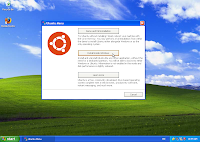 The install application gives you three choices. The first one being to reboot your system and use the CD-ROM directly to demo and install Ubuntu, the third sends you to the Ubuntu website.
For the purpose of this post I will instead walk you through option 2, which is to install Ubuntu alongside Windows, from within Windows.
 You will then be presented with all the questions that make sure the installer knows everything it needs to know about the installation of Ubuntu you want to do. Choose your username, password, and where you want to install Ubuntu (which Windows harddrive, C:, D:, or whatever), what language you want to see Ubuntu in, etc.
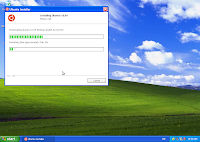 If you're using the standalone Wubi app, you will need to wait a bit while the Ubuntu CD ISO image is being downloaded. The image is necessary, as the standalone app does not contain the required packages for the install.
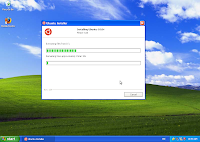 Wubi will then proceed to the next part of the installation, which is to copy everything it needs to your hard drive in a ubuntu folder on the hard drive you selected in the preceeding screen.
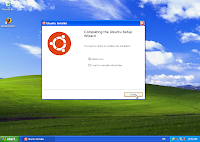 Once the first part of the installation is over, select what you want to do... my preference is to reboot right away and carry on with the rest of the installation procedure.
 Once your computer has booted, you will be presented with a menu. That menu will time out and default to Windows after a few seconds. Choose Ubuntu to continue with the installation.
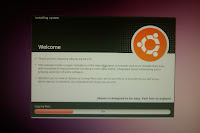 You are now booting into the real thing: at this point you are in Ubuntu, but the installation isn't quite done yet, so grab a (quick) coffee while the last tidbits get copied and configured.
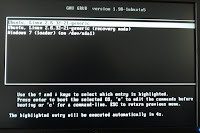 At the end of the second part of the installation, your computer will reboot again, present you again with the first menu where you will want to choose Ubuntu, and show an additional menu where you can choose to start Ubuntu in recovery mode, should you need to fix a broken installation. From there, you can also go back to Windows.
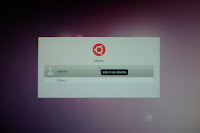 Voilà, the installation is done. At this point, all that is left to do is click on your username in the lis and enter the password you chose back in Windows during the first phase of the installation to get to the Ubuntu desktop.
Wubi is a very nice tool if you want to try out Ubuntu for the first time. It allows you to install Ubuntu alongside Windows, without re-partitioning your hard-drive. All this from the CD-ROM if you load it in computer while Windows is running, or downloadable as a standalone app.
The Ubuntu QA team is always looking for help to test installing Ubuntu using Wubi. It's both a great way to try Ubuntu if you really still need to run Windows on your computer and want to help out with testing Ubuntu, or as any kind of first jump into testing and QA. Testing efforts are being tracked on the Ubuntu ISO Tracker. If you want to help, please read the documentation first.
So if you chose to download Wubi's standalone application, double-click on its icon, or load in the Ubuntu CD-ROM you may have just burned (or received from shipit or your LoCo team).
If you're using a CD-ROM, Wubi should start automatically (or in Windows 7, you should see an autorun dialog).


 The install application gives you three choices. The first one being to reboot your system and use the CD-ROM directly to demo and install Ubuntu, the third sends you to the Ubuntu website.
For the purpose of this post I will instead walk you through option 2, which is to install Ubuntu alongside Windows, from within Windows.
 You will then be presented with all the questions that make sure the installer knows everything it needs to know about the installation of Ubuntu you want to do. Choose your username, password, and where you want to install Ubuntu (which Windows harddrive, C:, D:, or whatever), what language you want to see Ubuntu in, etc.
 If you're using the standalone Wubi app, you will need to wait a bit while the Ubuntu CD ISO image is being downloaded. The image is necessary, as the standalone app does not contain the required packages for the install.
 Wubi will then proceed to the next part of the installation, which is to copy everything it needs to your hard drive in a ubuntu folder on the hard drive you selected in the preceeding screen.
 Once the first part of the installation is over, select what you want to do... my preference is to reboot right away and carry on with the rest of the installation procedure.
 Once your computer has booted, you will be presented with a menu. That menu will time out and default to Windows after a few seconds. Choose Ubuntu to continue with the installation.
 You are now booting into the real thing: at this point you are in Ubuntu, but the installation isn't quite done yet, so grab a (quick) coffee while the last tidbits get copied and configured.
 At the end of the second part of the installation, your computer will reboot again, present you again with the first menu where you will want to choose Ubuntu, and show an additional menu where you can choose to start Ubuntu in recovery mode, should you need to fix a broken installation. From there, you can also go back to Windows.
 Voilà, the installation is done. At this point, all that is left to do is click on your username in the lis and enter the password you chose back in Windows during the first phase of the installation to get to the Ubuntu desktop.
Tuesday, 27 April 2010
You're invited: Montreal Lucid Lynx release party!
The Ubuntu-Quebec team is having a party here in Montreal (and in other cities too!!!) once more, this time to celebrate the release of Lucid Lynx. This will once again be held at the Bar Le Saint-Sulpice:
Bar Le Saint-Sulpice
1680, Saint-Denis,
Montréal, Québec,
H2X3K6,
514 844-9458
Everyone's invited to join us there this Thursday, April 29th.
Lots of people have already either RSVP'd using the wonderful LoCo Directory event pages, and many others have confirmed their presence already...
There's going to be a couple of other parties going on this time in the province: another one in Montreal on May 20th, Dummondville and Quebec city on the 5th and 6th of May; if you want to know more, don't hesitate to visit our wiki page for the Lucid release parties organized by Ubuntu-Quebec: https://wiki.ubuntu.com/QuebecTeam/LucidParty
Join us and have a chance to meet other Ubuntu enthusiasts like you :)
Bar Le Saint-Sulpice
1680, Saint-Denis,
Montréal, Québec,
H2X3K6,
514 844-9458
Everyone's invited to join us there this Thursday, April 29th.
Lots of people have already either RSVP'd using the wonderful LoCo Directory event pages, and many others have confirmed their presence already...
There's going to be a couple of other parties going on this time in the province: another one in Montreal on May 20th, Dummondville and Quebec city on the 5th and 6th of May; if you want to know more, don't hesitate to visit our wiki page for the Lucid release parties organized by Ubuntu-Quebec: https://wiki.ubuntu.com/QuebecTeam/LucidParty
Join us and have a chance to meet other Ubuntu enthusiasts like you :)
Wednesday, 7 April 2010
In retrospect: the good and the bad about the Global Jam event in Montreal
Well, it's better late than never. The bad is obviously how it has taken me more than a week to get to writing this blog post about how well our Global Jam event went :)
Seriously though, I did notice there were slightly fewer people this time around, but this can be inputed to a number of variables, so I really have no reason to complain, we had a great time, found a great number of bugs that were reported (and/or triaged), and it's essentially a clear success. Thanks to all those who participated in making this a great event.
If you want to look at the pictures for our event, you can see them here. There was also a live video made by r2mxr, but I can't find the link to it anymore... I promise I will update about it soon.
Thanks to Fabian Rodriguez and David Bensimon who joined in and helped out a lot in finding bugs, testing, reproducing, and confirming bugs.
Thanks to Philippe Gauthier who did a terrific job at a number of things, including setting, at least in my eyes, the record for the quickest testing process ever. Wine with a Windows app, as well as other Linux applications installed in record time :)
Obviously, thanks to the presenters for a great time: Ronan Jouchet, Michael Faille, Jeff Fortin... You did great, and I learned a lot. I'm sure a lot of others did as well.
Thanks to the SUPInfo students for visiting, you boosted our numbers and gave us a new and different outlook on various issues, which was a clear benefit.
Thanks to ETS, and in particular to Oleg Litvinsky for doing an awesome job at the logistics. I've never seen a room get set up so fast, I felt useless :)
Finally, thanks to those who came in to join us to see presentations or help out with bugs, it was great to see you all and meet new people, or others who we discuss with on the mailing list but rarely have a chance to talk to, face-to-face.
Seriously though, I did notice there were slightly fewer people this time around, but this can be inputed to a number of variables, so I really have no reason to complain, we had a great time, found a great number of bugs that were reported (and/or triaged), and it's essentially a clear success. Thanks to all those who participated in making this a great event.
If you want to look at the pictures for our event, you can see them here. There was also a live video made by r2mxr, but I can't find the link to it anymore... I promise I will update about it soon.
Thanks to Fabian Rodriguez and David Bensimon who joined in and helped out a lot in finding bugs, testing, reproducing, and confirming bugs.
Thanks to Philippe Gauthier who did a terrific job at a number of things, including setting, at least in my eyes, the record for the quickest testing process ever. Wine with a Windows app, as well as other Linux applications installed in record time :)
Obviously, thanks to the presenters for a great time: Ronan Jouchet, Michael Faille, Jeff Fortin... You did great, and I learned a lot. I'm sure a lot of others did as well.
Thanks to the SUPInfo students for visiting, you boosted our numbers and gave us a new and different outlook on various issues, which was a clear benefit.
Thanks to ETS, and in particular to Oleg Litvinsky for doing an awesome job at the logistics. I've never seen a room get set up so fast, I felt useless :)
Finally, thanks to those who came in to join us to see presentations or help out with bugs, it was great to see you all and meet new people, or others who we discuss with on the mailing list but rarely have a chance to talk to, face-to-face.
Monday, 22 March 2010
News about the Global Jam in Montreal
I'm amazed by the amount of interest we're gathering here in Montreal for the Global Jam and the new version Ubuntu in general. I'm very eager to put in lots of work on triaging and helping people understand how to create packages or prepare patches to packages, but I've been contacted by a few people and thought it would be good to share on the awesome presentations and presenters we'll be able to see here this weekend:
- A presentation MythTV and video capture, by Marc-André Gingras
- Club Capra / a robotics project that was migrated from Windows to Ubuntu, and how that was done, by Michael Faille
- An overview of PiTiVi and video edition, by Jeff Fortin (surely along with a bug jam blitz on PiTiVi?)
- A presentation on UbuntuStudio, JACK, and Ardour; by Ronan Jouchet
To get all the juicy details, check out https://wiki.ubuntu.com/QuebecTeam/GlobalJam10.03
I seriously can't wait until Friday!
Tuesday, 9 March 2010
A Global Jam event in Montreal again
It's always nice to see the amount of interest that just a simple table at say, Geekfest Montreal can generate. We gave out a couple of CDs, showed off 10.04, and generally got a very nice amount of support and interest for the Ubuntu-QC LoCo and our Global Jam event.
And about this event?
Well, preparations are going quite well. With the location secured (thanks ETS!!!) (and thus the audio-video equipment, since our rooms are already fitted with a project in one real nicely done table), we'll be ready to host a few presentations. Already one of the confirmed ones will be a student of ETS presenting a robot his team built, and how it's OS was migrated from Windows to Ubuntu.
What's left to decide is much of the little organizational details. For presentations, when will we have them? How do we deal with the fact that WiFi will probably fail? How about the relatively few power sockets available? Do we split the weekend into sessions on different tasks or subjects, and if so, how?
We've had great support from LAN-ETS last October when they helped us out immensely by lending us power bars and wicked cool ethernet cable bundles and a switch. I hope they will agree to help us out once again.
We're also in discussion to get two additional presentations going: MythTV on Ubuntu and PiTiVi. Like last time, I may give a quick crash-course on patching applications and preparing packages.
Of course, we're not just going to focus on showing stuff -- we do plan on getting much more involved than last time in triaging and patching bugs. With our success in October, I'm very confident that the Ubuntu-Quebec team will rock at the UGJ! PiTiVi is already one aspect we will most likely be looking at in detail, and I do hope there will be more: I will obviously be very happy to help out poeple (and have people help me) with giving some love to NetworkManager. I can already think of usb-creator as another pet project that will likely receive some attention.
With the responses we got from the quick installfest we set up last time, the idea of an upgrade Jam is another that seems to be a big hit for the people here. Lucid is sure to be a great release, and we're very eager to give it another big round of testing with all the cool toys people could bring to our Montreal event!
One of the big challenges this time around will be gathering more people from farther around the province. It would be great if people from Quebec city could join us, or even from Chicoutimi or elsewhere. It's also one of the reasons why we try to have as many things going around at the same time as possible, so trips to Montreal would be easier to schedule.
If you're in the Quebec province and more specifically in the Montreal region during the March 26-28 weekend, don't hesitate to come join us!
Sunday, 7 March 2010
Global Jam à Montréal: on récidive!
Il me fait plaisir d'annoncer que la participation des utilisateurs Ubuntu montréalais au Ubuntu Global Jam se fera encore une fois, un peu avant la sortie officielle de Lucid Lynx (la version 10.04, présentement en développement), à l'École de Technologie Supérieure!
Les locaux ont été officialisés: du 26 au 28 mars, nous pourrons passer la fin de semaine dans les locaux de l'ETS, soit les salles de classe A-1300 et A-1238 (en haut des escaliers de l'entrée principale, puis à gauche). N'hésitez pas à consulter la page wiki QuebecTeam/GlobalJam pour l'horaire exact ainsi que les directions pour s'y rendre!
Un gros merci à l'administration de l'ETS pour bien vouloir supporter l'événement (et donc Ubuntu!), et à Clod Patry et Oleg Litvinski pour leur aide avec les détails administratifs.
Vous êtes donc invités à participer à des efforts d'identification, de tri et de "patchage" de bogues avec nous, ainsi qu'à venir poser des questions, essayer la nouvelle version "live" ou l'installer, ou même simplement essayer Ubuntu pour une première fois sur votre ordinateur, dans un environnement convivial où vous pourrez vous sentir bien à l'aise de demander de l'aide si vous en avez besoin... Où simplement venir rencontrez d'autres utilisateurs pour discuter de tout et de rien!
Quelques présentations devraient être planifiées d'ici fin mars. Entre autres, un élève de l'ETS, Michael Faille, nous fera la présentation d'un projet robotique réalisé pas un groupe de l'ETS et roulant sur Ubuntu (depuis sa migration de Windows!). On prévoit certainement encore présenter de façon survolée l'entrée de bogues dans Launchpad, ou alors le tri de ceux-ci si vous voulez aider les développeurs.
Cette fois-ci, beaucoup d'emphase sera mise sur le travail direct en équipe sur les différents bugs qui pourront avoir été soulevés. Il reste à déterminer la formule exacte, mais le but sera de démontrer l'intérêt de notre équipe dans la qualité de la distribution :)
D'ici là, il reste un tas de choses à planifier. Si vous voulez aider dans la réalisation de l'événement ou vous avez des idées, n'hésitez pas à en faire part sur la liste de distribution Ubuntu-QC ou sur notre canal sur Freenode: #ubuntu-qc.
L'École de Technologie Supérieure (ETS) est située au 100 rue Notre-Dame Ouest, soit à deux minutes du métro Bonaventure, au coin Notre-Dame et Peel.
Wednesday, 30 September 2009
Ubuntu Global Jam in Montreal, this weekend
 There's really only a couple of hours left until our Global Jam event in Montreal kicks off: a truly awesome setup, that can be run thanks to the amazing help of komputes and the rooms gratiously granted to us by the ETS (École de Technologie Supérieure), GULL-ETS, and Clod Patry. Thanks all.
So this is my official invitation: are you an Ubuntu enthusiast in the region of Montreal? Are you interested in helping out fixing bugs, getting to know more about your favorite OS or even just getting to know what all this fuss with "Linux" and "Ubuntu" is about?
Then come join us at ÉTS, for this three-day event: we've got all kinds of really cool stuff planned, as well as interesting presentations on packaging, bug triage, Asterisk, to only name a few. I'll be presenting on a couple of subjects myself, such as sysadmin tools and helping out with coding.
Here's the deal:
École de technologie supérieure (http://www.etsmtl.ca/)
- October 2 (16h to 23h), and 3-4 (12h to 18h),
- 1100 rue Notre-Dame Ouest
- Salles/Rooms A-1300 et A-1238
- More information at https://wiki.ubuntu.com/QuebecTeam/GlobalJam2009
Monday, 17 August 2009
Ubuntu Developer Week coming up!
As Daniel Holbach is announcing in his blog, an all new Ubuntu Developer Week is coming up soon. It will be held from from Monday, 31st August 2009 to Friday, 4th September 2009.
Ubuntu Developer Week is a great way to get to know more of the inner workings of Ubuntu. Plus, it's always packed with incredible talks about various subjects: check out the timetable.
You may also want to take a look at the brochure if you want to know how or where to start developing for Ubuntu.
Subjects announced obviously follow the latest developments in the community, so we'll get to know about fun stuff like Quickly, Papercuts, Mago, as well as lots about Launchpad.
Ubuntu Developer Week is a great way to get to know more of the inner workings of Ubuntu. Plus, it's always packed with incredible talks about various subjects: check out the timetable.
You may also want to take a look at the brochure if you want to know how or where to start developing for Ubuntu.
Subjects announced obviously follow the latest developments in the community, so we'll get to know about fun stuff like Quickly, Papercuts, Mago, as well as lots about Launchpad.
Monday, 29 June 2009
Ottawa Linux Symposium 2009 in Montreal - interesting tidbits
Hey, it seems Canonical is a sponsor for the Linux Symposium 2009!
Thanks Canonical for helping out and contributing to events around here too!
Does that mean we'll see some Ubuntu rock stars at the conference? :)
Thanks Canonical for helping out and contributing to events around here too!
Does that mean we'll see some Ubuntu rock stars at the conference? :)
Monday, 22 December 2008
Why Ubuntu is important to me
Well, maybe I'm a little late with all of this, but I do invite you to read Jono Bacon's great post "The Ubuntu Ethos", as well as Daniel Holbach's take on the subject: "Why I believe in Ubuntu".
As for my part, I'll have to go with the same answers as them. It's just really stimulating to see all the work that we can put together when working as a community. Sure, there is room for improvement, sometimes things are a little ugly, but overall everybody does a great job. In Ubuntu-QC for example, there is a clear motivation to help out people, and that's nice to see. Just about everywhere else, I see the same drive to make a difference, to help out those who hope for something better (by showing them about our wonderful distro!) and to support those who are just having trouble with one or two little details on their system.
I also feel that drive, and it's great to see that people are recognizing it and are happy to see our interest in their software, in Ubuntu, and in free software in general.
And even more importantly, it's nice to have a nice community you can go have a beer with every once in a while, and talk about those weird computer things that interest us.
As David Thomas so nicely put it in his post on the subject, learning about Ubuntu has been the catalyst to doing more, or at least finding out where to start. I had been wanting to participate more in free software, and as I learned about Ubuntu I also learned how I could make a difference, and found a great opportunity to contribute where it matters, where you've got a friendly atmosphere to work in, and where what you can do to help is clear and goals are attainable.
As for my part, I'll have to go with the same answers as them. It's just really stimulating to see all the work that we can put together when working as a community. Sure, there is room for improvement, sometimes things are a little ugly, but overall everybody does a great job. In Ubuntu-QC for example, there is a clear motivation to help out people, and that's nice to see. Just about everywhere else, I see the same drive to make a difference, to help out those who hope for something better (by showing them about our wonderful distro!) and to support those who are just having trouble with one or two little details on their system.
I also feel that drive, and it's great to see that people are recognizing it and are happy to see our interest in their software, in Ubuntu, and in free software in general.
And even more importantly, it's nice to have a nice community you can go have a beer with every once in a while, and talk about those weird computer things that interest us.
As David Thomas so nicely put it in his post on the subject, learning about Ubuntu has been the catalyst to doing more, or at least finding out where to start. I had been wanting to participate more in free software, and as I learned about Ubuntu I also learned how I could make a difference, and found a great opportunity to contribute where it matters, where you've got a friendly atmosphere to work in, and where what you can do to help is clear and goals are attainable.
Subscribe to:
Posts (Atom)